
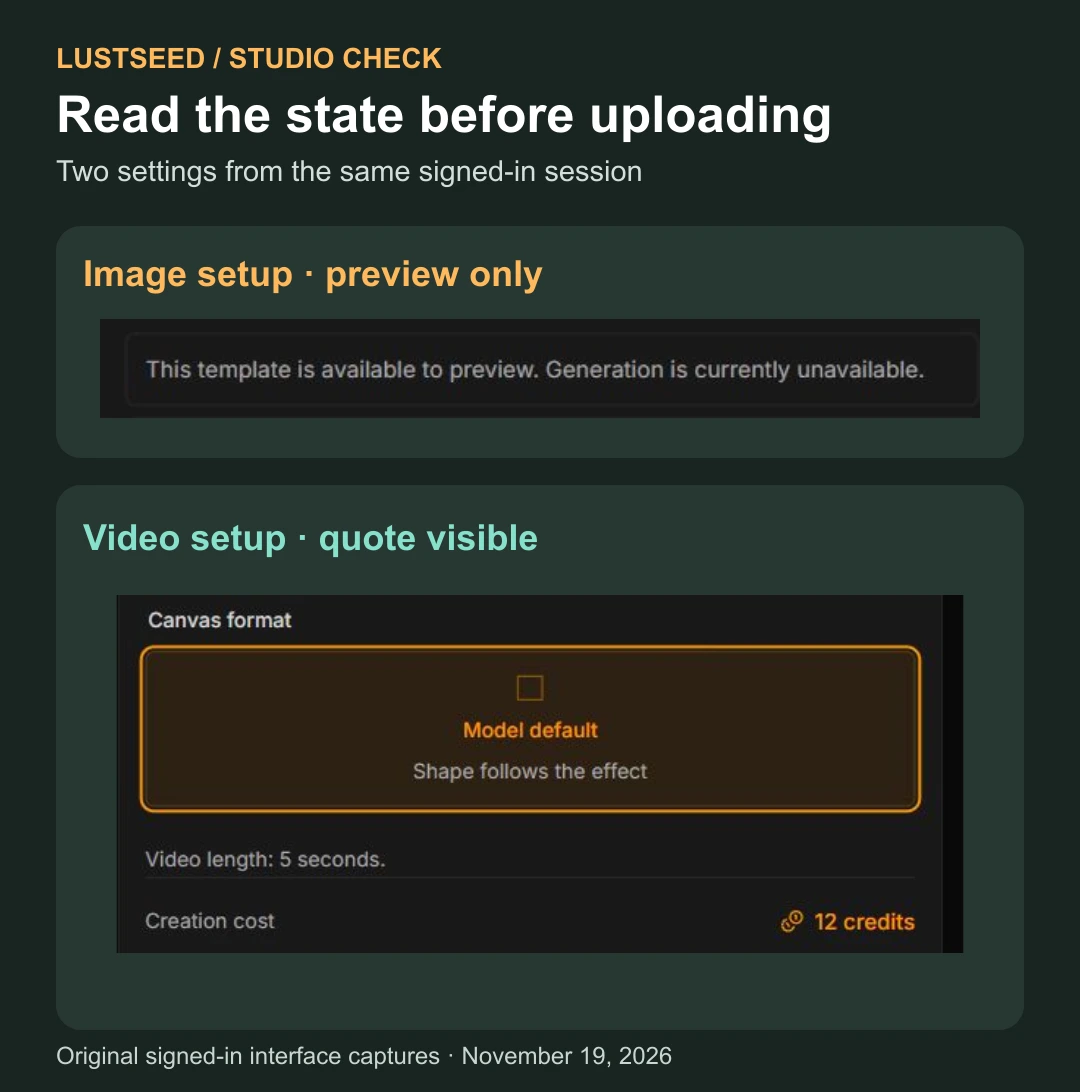
Check the effect in LustSeed Studio before preparing a reference or buying credits. In our signed-in check, the starting Image effect was preview only. Video showed a five-second setup for 12 credits with the canvas set to Model default. For a project with a fixed format, verify one sample in your editor before planning the full sequence.
Start with the effect you want to use
Use Explore to identify the effect. The example can help you judge the kind of motion it demonstrates. For your own image, check the effect’s Create control, then read the setup in Studio. Follow the catalog route when the exact effect matters. The main Create entry can open a different setup from the one you were browsing. LustSeed catalog
On November 19, 2026, we opened Create in a signed-in desktop Chrome session. Studio started in Image mode with Model default selected. It showed the message “This template is available to preview. Generation is currently unavailable.” At that point, preparing a reference for that setup would have been wasted work.
Switching to Video changed what the screen offered. The canvas still read Model default. Studio listed 5 seconds and a 12-credit creation cost, and Create video stayed disabled with the reference field empty. We stopped at that screen. This check establishes what a user can see before submitting. We did not measure output quality, queue time, or download behavior. LustSeed Studio
Prepare the reference against three separate limits
The reference field in the settings we checked listed PNG, JPEG and WebP, a 10 MB cap, and a 512–2,048 pixel longest side. It also asked the user to confirm permission to use the image. The dimensions apply to the longer of the two sides. Check that number separately from the file size and format.
| Your file | What to check against the displayed limits |
|---|---|
| 2,400 × 1,350 JPEG at 2 MB | The longest side is too large. Resize proportionally to 1,920 × 1,080 to keep the same framing at a smaller size. |
| 1,600 × 900 PNG at 11 MB | The dimensions fit, but the file is too large. Re-export with smaller file size while keeping the framing. |
| 400 × 300 WebP at 150 KB | The longest side is too short. Start with a higher-resolution original if you have one. |
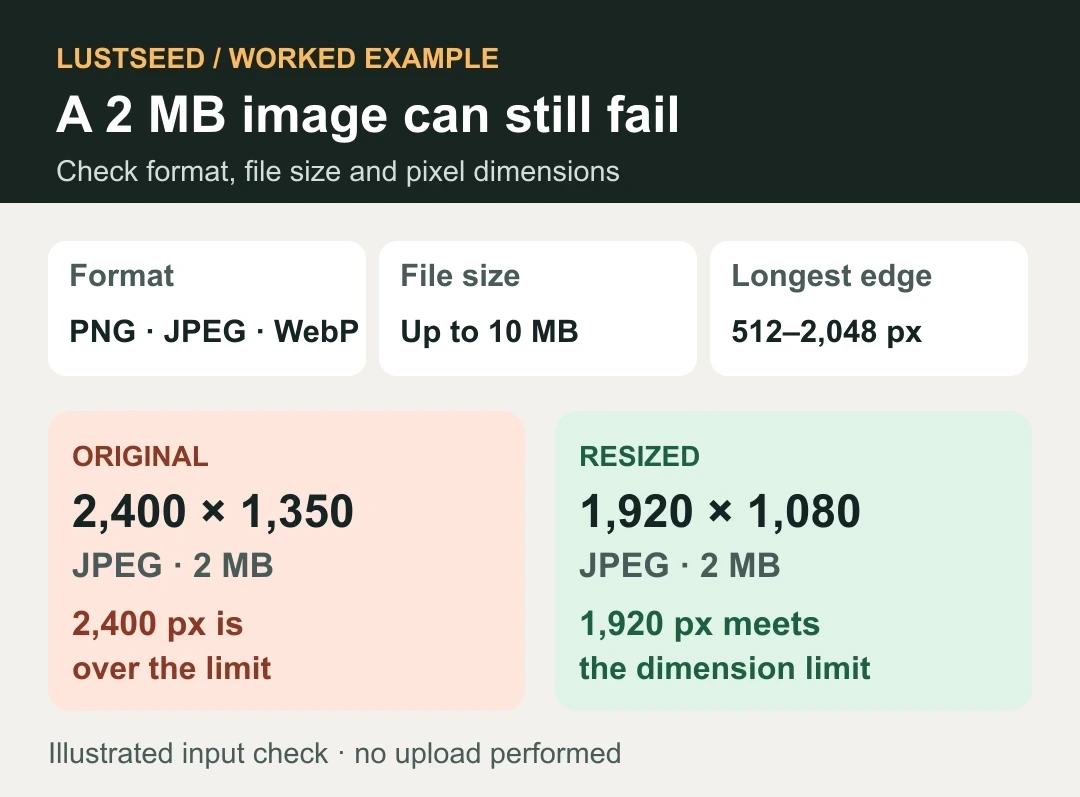
These worked examples use Studio’s displayed limits. Reopen the chosen effect and check its requirements if you switch modes. If the action stays disabled after you select a file, first check the effect’s availability and the permission confirmation. Then check the file the editor actually selected, including its format, size, and dimensions. LustSeed Studio
Pick the canvas for the edit you need to deliver
In our Video setup, Model default was labeled “Shape follows the effect.” A portrait reference can help compose the shot, but the default label gives you no numeric output ratio. If your brief calls for a 9:16 clip, look for an explicit ratio option. When the effect offers only Model default, use a disposable first reference and check the finished sample’s dimensions before building the rest of the sequence.
For a 16:9 deliverable, check whether the sample fills your edit frame or needs a crop. Keep the main subject away from the edges of the test image so you can see what would survive that crop. Treat the five-second setting as the duration to plan around in this setup. If the brief calls for one continuous ten-second movement, confirm that the selected effect supports the longer duration before committing the shot.
Turn the per-job quote into a first-pass budget
On the same day we checked Studio, Pricing showed the Basic plan under Monthly with Telegram Stars selected. The page displayed 300 credits for a one-time charge of 750 Stars and a $9.99 reference price. Use the amount shown for your selected payment method to plan the purchase. We read the plan display and did not place an order. LustSeed Pricing
At the displayed 12 credits per video, 300 credits cover 25 requests at that quote, assuming the full balance is available for those jobs. For a project with three shots and two attempts per shot, set aside 72 credits for six requests at the same quote. Recalculate if a different effect changes the per-job amount. The number of usable clips depends on which results meet the brief.
Read the status and credit activity before retrying
LustSeed’s Help page says the quoted credits are reserved when a job enters the queue. Use the status and your credit activity together to decide whether to wait or retry. We read the provider’s rules for these states. Our test ended before submission. LustSeed Help & safety
- Queued or running: Check the existing job in My collection. Help says the server saves job progress, so you can return to it after leaving the page.
- Awaiting a provider check: The provider may already have accepted the request. The credits can stay reserved until reconciliation. Check the same job and its ledger entry before starting a second request.
- Cancelled while queued or definitively failed: Help says the reservation is returned. Check the credit activity for that job before spending those credits again. The return concerns the job reservation. Payment disputes follow the billing policy.
Know what disappears when you delete a creation
Help describes finished, failed, and cancelled creations as eligible for deletion. It says a queued job can be cancelled first and a running job needs to finish. According to Help, deleting a creation revokes account access, removes the saved prompt, and queues the locally stored result for cleanup. Provider-side retention and minimal operational records follow separate rules. We did not test deletion. LustSeed Help & safety
Who can process an image from the private workspace?
Help describes creations and downloads as restricted to the signed-in owner. The operator and the configured generation provider may still process a submitted reference. The privacy notice was marked draft when we checked, and it did not establish a provider retention deadline. If you need a documented deletion window for a sensitive project, read the current notice and get that answer before uploading. LustSeed Privacy notice
For a first job, choose an available video effect and use a low-sensitivity reference you have permission to use. Record the canvas label, duration, and quote before submitting. If you get a sample, check its frame dimensions and usable duration in your editor before planning the rest of the work around it.