Start an AI group chat with two characters and choose who replies manually. That gives you a clean way to tell a routing problem from a character that speaks in the wrong voice. Check room history and private-chat memory separately, and confirm that your group supports any media feature you expect to use.
What the guest room actually did
On September 24, 2026, I sent a harmless scene question to one public, two-character SpicyChat group in desktop Chrome as a guest. My message appeared and waited at the speaker picker. I selected Morien and received one reply. I then selected Ellie and received a separate reply that reacted to Morien. In that room, the first reply required a speaker selection after sending the message. This was one guest session, without a paid auto-selection, media or private-memory test.
On November 12, I reopened SpicyChat’s homepage while signed out. Web version 4.10.6 showed a group-size filter category. I confirmed that discovery control, without rerunning the conversation. The current group guide describes size filters for public rooms and manual selection for free users. Its premium Auto Response picks a speaker after your message. After a character reply, Next asks it to choose again. Check whether you want automatic selection, hands-free continuation, or both before choosing a plan.
A speaker switch does not reset the room
The speaker picker answers who replies. A separate setting or prompt rule answers what that speaker can see. SpicyChat’s support note describes a reply assembled from the user persona, the active character’s definition, and recent messages and memories that fit in context. Picking character B changes the active character while recent room messages can still inform B’s answer.
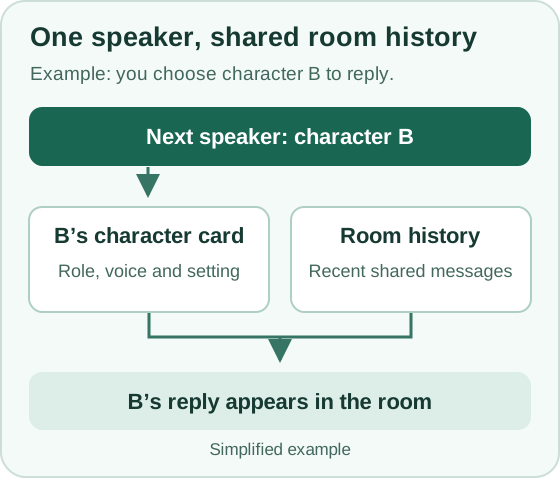
SillyTavern’s group guide makes that distinction explicit. Its Manual strategy lets you choose a character. Its default card-handling mode uses the active character’s card. Joining cards combines character definitions, but both handling modes share group history. If two voices blur, try manual selection and separate cards first. That changes one variable at a time.
Run a two-character test before adding a third
This is a proposed check you can repeat. Keep the room and model settings unchanged. Give two fictional adults different jobs: Mara checks museum closing hours, and Jules handles visitor routes. Use these prompts in a new test room so you know where each fact came from.
- Send a shared fact and choose Mara. Say, “The museum closes at eight. Mara, when should the last tour leave?” Record the displayed speaker and the job reflected in the reply. If your message appears but there is no answer, check the responder picker before sending again.
- Send a second question, then choose Jules. Ask which exit visitors should use after the last tour. Jules may refer to the closing time because it was stated in the room. If the displayed speaker is Jules but the text answers as Mara, review the character definitions or card handling before changing the reply order.
- Check private-to-room memory separately. If the service offers private chats with the same character, put a different harmless detail there, such as a spare key in a blue tin. Return to the group and ask where the spare key is without giving the answer. A matching reply is a reason to check that service’s memory settings. A miss leaves the memory behavior unresolved.
The third step matters because services implement cross-chat memory differently. For example, Nomi’s Backchanneling guide says its toggle controls recent context between a private chat and a specific group. Its long-term memories can still be shared across conversations. Use fictional test details and keep sensitive facts out of the experiment.
Check group media and drafts before committing
SpicyChat’s group documentation lists speech playback, in-chat image generation and sending images as unavailable in groups. An option you see in a one-to-one chat may therefore be irrelevant to your group plan. The same guide describes unfinished group drafts as browser- and device-local, and limits which characters can join a room according to its visibility. If you are building a room with private characters, check that membership rule before drafting the scenario. Keep a local copy of any long scenario before changing browsers or clearing site data.
Next step
Run the first two turns in a small room and write down the selected speaker, the displayed speaker and one fact carried forward. If the turns behave as you expect, try automatic selection or expand the cast. If the replies drift, use the character-card consistency checklist to tighten the two roles first.